Floating overlay
Keep CueHide above the app you are presenting, recording, or sharing.
 CueHideGet CueHide for $9
A focused Mac teleprompter for natural delivery, reliable pacing, and supported capture-aware recording.
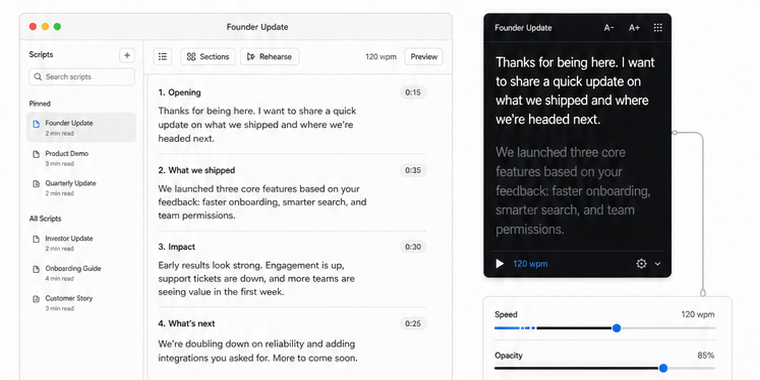
Place the script where your eyes naturally go, then tune the reading experience without rebuilding your recording setup.
Keep CueHide above the app you are presenting, recording, or sharing.
Balance readability with the content behind your prompt.
Choose a predictable fixed scroll speed and change it as you rehearse.
Choose the guidance style that fits the take without moving your script into a cloud production suite.
Apple on-device speech recognition follows your words, highlights progress, and keeps the current line in view.
Scrolling moves at your chosen speed while you speak and pauses when you stop, without transcribing your words.
Use predictable fixed-speed scrolling with no microphone and direct pace controls.
CueHide uses the macOS window-sharing controls available to native apps and keeps the limitations visible instead of promising the impossible.
Your script remains on your screen while you deliver the take.
The CueHide window is excluded from supported macOS capture paths.
Run a short test with the exact app and capture mode you plan to use.
Build a sequence of titled prompts, switch between them from the overlay, and keep the controls you need close to the take.
Create, title, preview, and switch between prompts for sales calls and structured presentations.
Write in CueHide or import a plain-text script without uploading it to a cloud workspace.
Adjust speed, font, opacity, size, placement, lock, and click-through while you work.
Bring in the words you want beside the camera.
Adjust position, pace, size, and opacity.
Check your capture mode, then deliver the take.
Get CueHide for Mac with a one-time $9 purchase.
Get CueHide for $9One-time purchase. No subscription.